
SavedInsta - Download Instagram Photo
Download Instagram Photo Instantly with the Best Downloader
Instagram Photo Downloader – Save Your Favorite Moments in Seconds
What Is an Instagram Photo Downloader?
Instagram is one of the most popular platforms for sharing photos – whether it’s travel memories, food shots, art, fashion, or inspirational quotes. But what happens when you come across a photo that you want to save for offline use or repost later?
That’s where our Instagram Photo Downloader comes in. It allows you to download Instagram photos from public posts in high resolution quickly and securely – without the need for third-party apps or logging in.
How to Download Instagram Photos – Step-by-Step
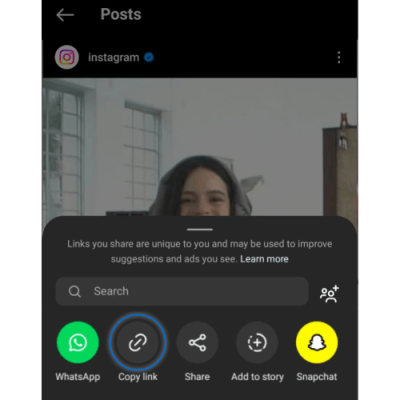
Step 1. Copy the Instagram Photo Link
On the Instagram App:
Find the photo you want to download. Tap the three dots (⋯) above the post, then tap “Copy Link.” The link will be copied to your clipboard.
On a Computer (PC/Mac):
Open the Instagram post, right-click on the date under the post, then click “Copy Link Address.”
Step 2. Paste into the Downloader Input Box
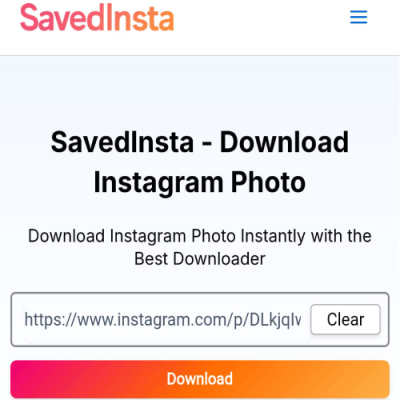
Come back to Savedinsta.com our Instagram Photo Downloader tool and paste the link into the input field.
Step 3. Click the 'Download' Button
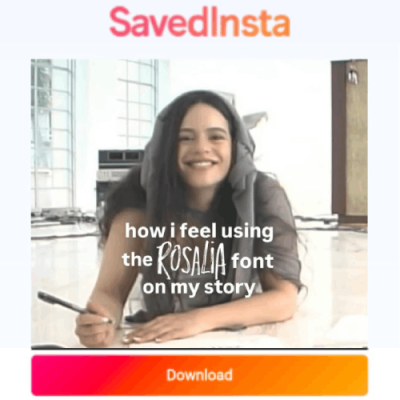
After pasting the link, hit the “Download” button. The tool will fetch and display a high-quality version of the image will appear.Hit the download button, and the downloading proccess start. The image will download directly to your phone or PC.
Why You Might Want to Download Instagram Photos
There are many reasons users want to download Instagram images
Save Memories
Whether it’s a vacation photo, a wedding moment, or a picture of your favorite pet posted by a friend, downloading it ensures it’s saved forever-even if the post is deleted.
Educational or Research Use
Educators or students may download photos for presentations, reference materials, or visual case studies (always crediting the source).
Wallpaper inspiration
Instagram is a goldmine of stunning visuals, from scenic landscapes to minimalist art. Saving these images allows users to turn them into wallpapers for desktops, phones, or even digital frames.
Artistic Inspiration
Photographers, designers, and artists often use Instagram as a source of visual inspiration. Saving photos helps you build a personal collection of ideas and styles.
Marketing or analysis
Marketers and creators download top influencer posts to study composition, branding, and engagement tactics for content strategy.
Design reference
Graphic designers and developers often download Instagram photos for layout ideas, typography inspiration, and color schemes- perfect for mood boards or creative brainstorming.
Features of Our Instagram Photo Downloader Tool

High-Resolution Images
Our tool preserves the original image quality, letting you download Instagram photos in full resolution.

Fast & Free
No limits, no fees, no watermarks. Download unlimited Instagram photos for free.
Safe & Secure
We never store or track your downloaded files. Our tool is SSL secured and fully privacy compliant.
No Login or App Required
You don’t need to create an account, log in, or install anything. Everything works from your browser.
Is Downloading Instagram Photos Legal?
We promote ethical content usage. Always respect creators’ rights and only use images for:
- Educational or research purposes
- Mood boards and personal collections
- Design studies or fair-use commentary
If you plan to repost or reuse images commercially, always get permission from the original creator.
✔️ Personal Use Is Okay
Downloading photos from public Instagram profiles for personal use, such as reference, offline viewing, or backup, is generally accepted.
❌ What to Avoid
- Downloading and reposting content without credit
- Using images for commercial purposes without permission
- Trying to download from private profiles, which our tool does not support
🔖 Always Give Credit
If you share a photo you downloaded, tag or mention the original creator. Respecting copyrights and user content is key to ethical use.
Supported Photo Formats
Single Image Posts
Download standalone photo posts in JPG or PNG.
Carousel Posts (Multiple Photos)
Easily download each image from multi-photo posts one by one.
Profile Pictures (Coming Soon)
High-resolution download of public profile display pictures is being developed.
Bonus: Use Cases for Instagram Photos
📅 Social Media Planning
Repost a customer’s image (with credit) as part of a brand campaign.
🏖️ Vacation Planning
Save scenic locations or travel recommendations for later use.
📝 Mood Boards
Designers and marketers can collect visuals for project mood boards or branding ideas.
🧠 Educational Use
Download diagrams, charts, or infographics for class projects or online courses.
Alternatives You Might Need
🎬 Instagram Reels Downloader – Save short videos in HD
📹 Instagram Video Downloader – Download longer video content
These tools are part of our growing suite to support users who love Instagram but need a little more flexibility and functionality.
Final Thoughts – Download Instagram Photos Quickly and Ethically
Instagram is a goldmine of visual storytelling. Our Instagram Photo Downloader helps you access that content responsibly and in full quality. Whether you’re collecting ideas or saving memories, the process is fast, free, and private.
Frequently Asked Questions
Yes! If the Instagram post has multiple images, our tool detects all of them and gives you options to download each one.
Absolutely. Our Instagram Photo Downloader works on Android, iOS, and desktop browsers.
No, it’s 100% free. There are no hidden charges, premium plans, or sign-up fees.
Yes. We use encrypted connections and don’t collect any user data. Your privacy is a priority.
No. We don’t modify the images. You get the exact same image as uploaded on Instagram, without any logos or overlays.